

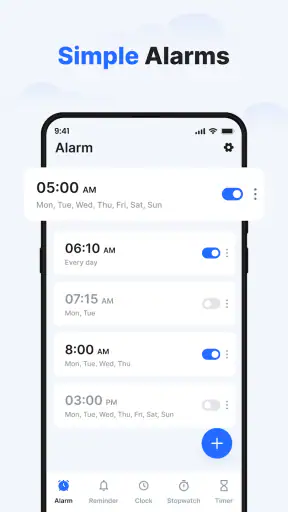
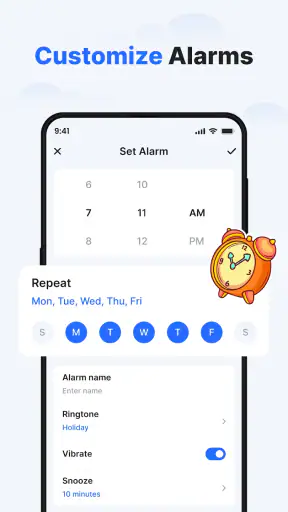
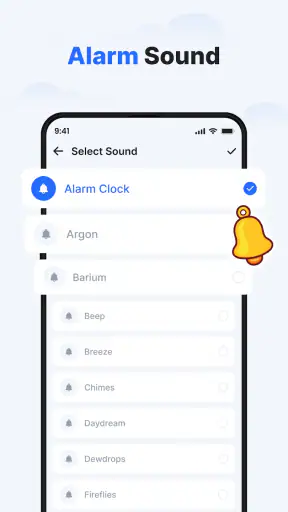
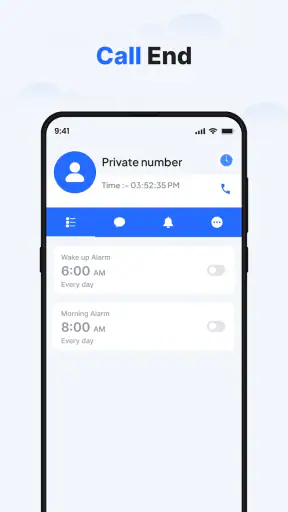
I like alarm apps that stay focused on the one job that matters: helping me wake up on time without turning the experience into a complicated project. Clock - Simple Alarm Clock, developed by Advance Logic, takes that straightforward approach while adding enough customization to make a daily routine feel less plain. It is a free productivity app for Android, aimed at anyone who wants alarms, reminders, bedtime support, themes, and widgets in one place.
After spending time with it, my impression is that its appeal comes from simplicity rather than novelty. The app is not trying to replace every planning tool on a phone. Instead, it brings several time-related tasks together and gives them a more personal interface. That makes it useful for ordinary mornings, medication reminders, study schedules, work shifts, and evening routines. The important question is whether those additions genuinely improve your day or merely add decoration to a function your phone already handles.
What Clock - Simple Alarm Clock actually offers
The store summary describes an alarm clock reminder with themes, widgets, and smart bedtime support, plus a loud alarm clock. In practical terms, that places it between a basic system clock and a more elaborate sleep-oriented tool. I see it as a daily utility first: something I would open to create or adjust alarms, then leave available for quick access through the phone interface.
The app is listed as suitable for Everyone, which matches its broad purpose. There is no narrow audience built into the concept. A student can use it for class preparation, a parent can set reminders around a household routine, and someone working irregular hours can create separate wake-up schedules. The same flexibility also means that people looking for a highly specialized sleep tracker may find the experience less targeted than a dedicated health app.
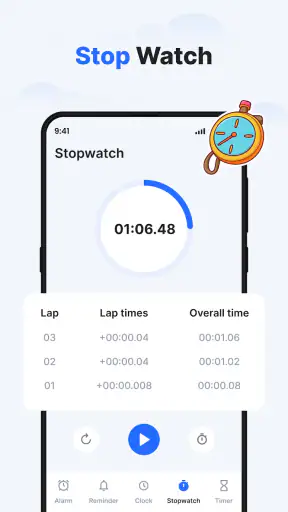
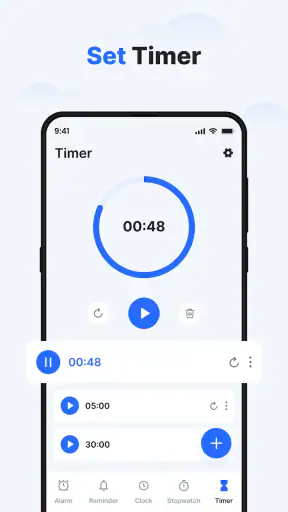
Its short store description is simply “Clock,” but that undersells the practical scope suggested by the longer summary. The useful distinction is that this is not only about reading the current time. It combines alarms and reminders with visual customization and widgets, so the phone can show time-related information without requiring me to open the full application every time.
Free access changes the value calculation
Clock - Simple Alarm Clock is free, so the basic decision is not whether the app is worth purchasing. It is whether installing another clock utility gives me enough convenience to justify the extra app in my routine. That is a much more favorable starting point than an app that asks for payment before I can test its central function.
I would still judge a free app by the time it saves and by how reliably it fits into my day. A free alarm that is awkward to configure is not automatically good value. Here, the combination of reminders, bedside use, themes, and widgets gives the app a clearer reason to exist than a plain duplicate clock. The benefit is strongest when I actually use more than one of those elements.
The app was released on February 8, 2024, and its current version is 26.0. It requires Android 11 or later, so compatibility is an important practical checkpoint before installation. If my phone runs an older Android release, the free price does not help because the app will not fit that device. For supported phones, however, there is no purchase barrier to trying its workflow.
The app has an average rating of 4.5 from around 7.7 thousand ratings, and it has passed one million installs. Those figures suggest that the concept has found a substantial audience, but I would not treat them as proof that every phone and routine will behave identically. Alarm reliability depends on the device, system settings, and how the phone handles background activity, so I would test an important alarm before trusting it for a flight, examination, or first day at a new job.
Where the value shows up in everyday use
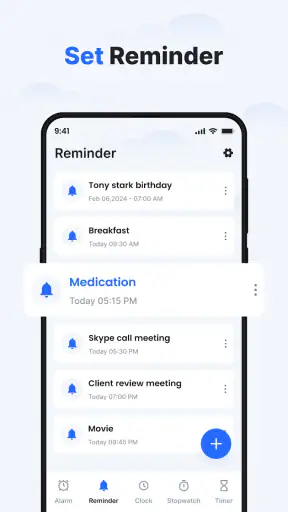
The strongest use case for me is a layered morning routine. I might set one alarm for getting out of bed and a separate reminder for the point when I need to leave home. That separation is more useful than placing every instruction inside one alarm label, because waking up and leaving on time are different events. The app’s reminder-oriented design makes it suitable for that kind of sequence.
A realistic example would be a weekday commute. I could use the alarm for waking, a reminder to start getting ready, and a widget to keep the current time visible on the home screen. The advantage is not that any one element is revolutionary. It is that the pieces support the same routine. I spend less time searching through unrelated calendar entries or opening a full planning app just to check what time I need to act.
Bedtime support is another area where the app can be useful without becoming a full sleep-analysis system. I can treat the evening reminder as a boundary: start winding down, put the phone aside, or prepare for the next morning. That is a behavioral cue rather than a medical measurement. I would value it precisely because it keeps the task understandable instead of presenting a large amount of sleep information that I may never use.
Widgets can make a meaningful difference for people who rely on visual prompts. A widget is helpful when I want the next time-based action visible as I move through the day. It can reduce the small friction of opening the app repeatedly, especially when the phone is being used for work or study. The trade-off is that widgets occupy home-screen space, so they are most worthwhile when I genuinely check them rather than adding them because they look attractive.
Customization that serves a purpose
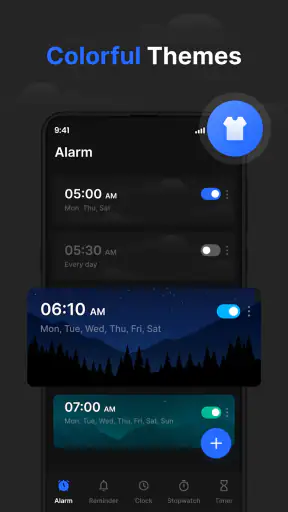
Themes are not essential to setting an alarm, but they can improve how comfortable the app feels during frequent use. A calmer appearance may be welcome at night, while a clearer, higher-contrast look can make morning checks easier. I see themes as a secondary benefit: they help the app fit my habits, but they should not be the reason I choose it unless visual consistency matters to me.
The key is to customize with restraint. If I keep changing the appearance, I may spend more time arranging the clock than using it. I would first establish dependable alarms and reminders, then choose one theme that is easy to read in the situations where I use the app most. That approach turns personalization into a practical aid rather than a distraction.
The “loud alarm clock” positioning also matters for heavy sleepers. A strong alarm can be reassuring, but loudness alone is not a complete wake-up strategy. I would place the phone where the sound is audible but not so close that I can silence it without becoming fully awake. For someone who regularly sleeps through alarms, the app may be part of a solution, not a guarantee.
Small workflow choices that make it more useful
One useful habit is to separate alarms by purpose instead of creating a long list of vaguely named times. Labels such as “wake up,” “leave home,” or “start revision” make the list easier to understand at a glance. This is especially valuable when a routine changes from day to day. Clear labels reduce the chance of disabling the wrong alarm in a sleepy moment.
I would also use the app for reminders that are connected to time but do not belong in a calendar. A calendar is better for appointments involving other people or locations. A clock reminder is better for a repeated personal cue, such as beginning a bedtime routine or taking a short break from a study session. That distinction prevents the app from becoming a cluttered substitute for every planning tool on the phone.
Another practical tip is to test the entire setup after adding a widget or changing the visual theme. The important question is not whether the screen looks good; it is whether the next action is obvious when I am tired or in a hurry. I would check the alarm name, the displayed time, and the phone’s volume behavior before relying on the arrangement.
For bedtime use, I would create a consistent evening reminder rather than several competing alerts. Too many notifications can make a routine feel noisy and encourage me to dismiss everything. One well-timed cue is more likely to become a habit. This is one of the app’s better potential strengths: it can support a routine without requiring me to build a complicated schedule.
The trade-offs I noticed
The largest limitation is that the app lives in a crowded category. Android already includes clock and alarm functions, and many users will find the built-in option perfectly adequate. If I only need one occasional alarm, installing a separate application may not deliver enough improvement. The extra value appears when I want reminders, widgets, bedtime cues, or a more personalized interface.
It is also not the obvious choice for someone seeking deep sleep science. The verified description points toward bedtime support, but that should not be confused with a specialist health platform. If I wanted detailed sleep trends, health integrations, or broader wellness analysis, I would look at a dedicated sleep application instead. Clock - Simple Alarm Clock makes more sense when I want a simple bedtime prompt rather than a complete sleep report.
There is a similar trade-off with scheduling complexity. People with highly irregular work patterns may need a more advanced planner that handles complicated recurring rules, multiple calendars, or extensive automation. This app’s strength is approachable time management, not necessarily the management of every unusual scheduling case. I would choose it for clarity first and complexity second.
Dependability deserves a cautious approach with any alarm application. Phone settings can affect sound, battery behavior, and notifications, even when the app itself is well designed. I would make sure the phone is not muted and would run a harmless test alarm before depending on it for something important. That is not a criticism unique to this app, but it is a responsibility users should take seriously when replacing a familiar system alarm.
The age rating of Everyone makes it broadly accessible, but broad accessibility does not mean every interface choice will suit every person. Someone who needs very specialized accessibility controls, unusually detailed scheduling, or a professional shift-management workflow should evaluate whether a dedicated alternative better matches those needs. The free price makes testing easy, but it does not remove the need to check personal fit.
Who will get the most from it
I would recommend it to people who want a cleaner relationship with their daily alarms without moving into a full productivity suite. Students can use it to divide waking, study, and bedtime cues. Remote workers can keep a visible time widget while using reminders to mark the start and end of focused work. Families may appreciate separate personal reminders, although each person’s routine may be better managed on their own device.
It is also a good candidate for anyone who finds the default clock visually dull or too limited. Themes and widgets give the experience a more deliberate feel, while the alarm and reminder functions remain familiar. The app is especially appealing when I want a single lightweight place for time-based prompts instead of combining a system clock, a notes app, and a calendar for small daily tasks.
People who should skip it are those who already use the built-in alarm successfully and do not want another app. I would also point specialists toward alternatives: sleep-focused users may prefer health tracking, and complex shift workers may need dedicated scheduling. The app’s value depends on wanting its combination of simplicity and customization, not merely wanting any alarm at all.
Because it requires Android 11 or later, owners of older devices should not plan around it. For supported Android users, the current version is 26.0, which gives the app a clear place in a modern phone setup. I would install it first for a low-risk routine, such as a weekend reminder or an evening wind-down cue, before making it responsible for a critical morning.
My buy-or-skip verdict
There is no purchase decision here in the usual sense: the app is free. My verdict is therefore a recommendation to try it when the default clock feels too bare, especially if I want a combination of alarms, reminders, bedtime cues, themes, and widgets. The free access makes experimentation reasonable, and the broad user base suggests it is not an obscure one-purpose utility.
I would skip it if my only requirement is a single dependable alarm and my phone already handles that well. I would also choose something else if I needed advanced sleep analysis, complex scheduling, or a specialized shift workflow. Those are not failures of this app; they are signs that its design is aimed at a simpler daily problem.
For me, the best reason to use Clock - Simple Alarm Clock is the way it can turn scattered time cues into one understandable routine. I can wake up, see the next reminder, use a bedtime prompt, and keep the relevant clock information close at hand without paying for access. Its real value is convenience with a low commitment, provided I take a moment to test the alarm behavior on my own phone.
Overall, I would recommend Clock - Simple Alarm Clock to Android users who want more than the basic system clock but less than a full productivity or sleep platform. It is a practical productivity app from Advance Logic, with the strongest appeal coming from its balanced mix of straightforward alarms and useful presentation options. If that balance matches your routine, it is worth trying; if your needs are highly specialized, the familiar built-in clock or a dedicated alternative may serve you better.


